I ran into problem that when I try to find extensions in the VS Code, it does not display anything and even not able to check for updates. In this scenario, I have downloaded newer version of VS Code but it was not the permanent solution to solve this problem.
In such type of issues, I found that our enterprise proxy block the request which sent to the respective software vendors. Finally I decided to get to know that how can I setup proxy settings in VS Code as I did with tortoiseSVN and other tools.
I found reference in VS Code documentation - Proxy server support
Many enterprises require that their computers run behind a proxy server and don't allow direct access to the Internet. A proxy server intermediary can limit access to the VS Code Extension Marketplace and prevent installing VS Code extensions.
Follow the below steps to setup proxy settings:
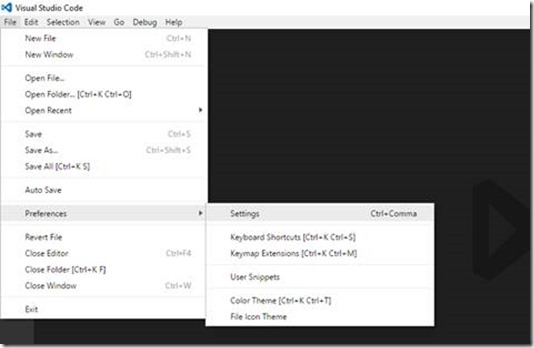
- File > Preferences > Settings
- Navigate to the HTTP settings section and you will find settings for proxy as shown in below image:
- Now change the proxy settings as per your environment, If you proxy does not require authentication then just simply enter proxy details:
"http.proxy": http://172.28.57.20:8080/
If proxy require authentication then you have to provide user details:"http.proxy": "http://niranjan:password@172.28.57.20:8080/"

Complete Settings which works in my case:
// VSCode: Place your settings in this file to overwrite the default settings
{
  "http.proxy": "http://user:pass@proxy.com:8080",
  "https.proxy": "http://user:pass@proxy.com:8080",
  "http.proxyStrictSSL": false
}
From documentation:
Additionally, use "http.proxyStrictSSL": false if your proxy server uses a self-signed certificate.
Note: VS Code supports http and https proxies, but not SOCKS proxies.


