Recently I needed to install npm on my workplace computer and it always showing below connection timeout error message every time when I run any command.
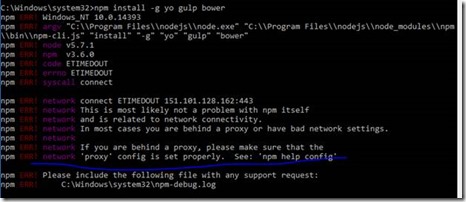
I have faced such issue with VS Code when trying to install extensions and updates. After going through documentation, I found that here is the same issue with proxy settings and I got information by running ‘npm help config’ command. It redirected me to the npm config documentation and I found this:

To authenticate my corporate proxy, I set the environment variables HTTP_PROXY and HTTPS_PROXY but npm did not recognized these environment variables.
After doing search on internet and from my previous experience with vscode issue, I found the following same way to configure the proxy for npm.
If you need to specify credentials, they can be passed in the url using the following syntax.
You can also set the proxy configuration as a command line argument or environment variable. Configuration parameters can be specified using -- when executing npm. So the proxy could also be specified as follows.
I have tried command line configuration to make it work and I have done my job.
Hope this help others also... Happy Coding!
I have faced such issue with VS Code when trying to install extensions and updates. After going through documentation, I found that here is the same issue with proxy settings and I got information by running ‘npm help config’ command. It redirected me to the npm config documentation and I found this:
To authenticate my corporate proxy, I set the environment variables HTTP_PROXY and HTTPS_PROXY but npm did not recognized these environment variables.
After doing search on internet and from my previous experience with vscode issue, I found the following same way to configure the proxy for npm.
npm config set proxy http://proxy.company.com:8080
npm config set https-proxy http://proxy.company.com:8080
If you need to specify credentials, they can be passed in the url using the following syntax.
http://user_name:password@proxy.company.com:8080
You can also set the proxy configuration as a command line argument or environment variable. Configuration parameters can be specified using -- when executing npm. So the proxy could also be specified as follows.
npm --https-proxy=http://niranjansingh:MyPass@172.29.01.01:8080 -g install yo
I have tried command line configuration to make it work and I have done my job.
Hope this help others also... Happy Coding!

